Tower Simulator 3 – Onboarding
Welcome to Tower Simulator 3! This guide will help you get from install → first successful session in just a few minutes.
1. Choose Your Experience
Before you start, decide how you want to play:
Default Experience (Quick Start)
- Uses built-in airlines and schedules.
- Fastest way to jump in.
Realistic Experience (Recommended)
- Real airlines, liveries, and schedules.
You can enhance your experience with:
- JustFlight Traffic https://shorturl.at/oVLrB
- Nyerges Design World Traffic/Color https://shorturl.at/5x3ma
- Community schedules & edits (free, via Discord)

2. Initial settings
First, make sure you have the correct language installed on your computer for voice commands to work. Follow these simple steps:
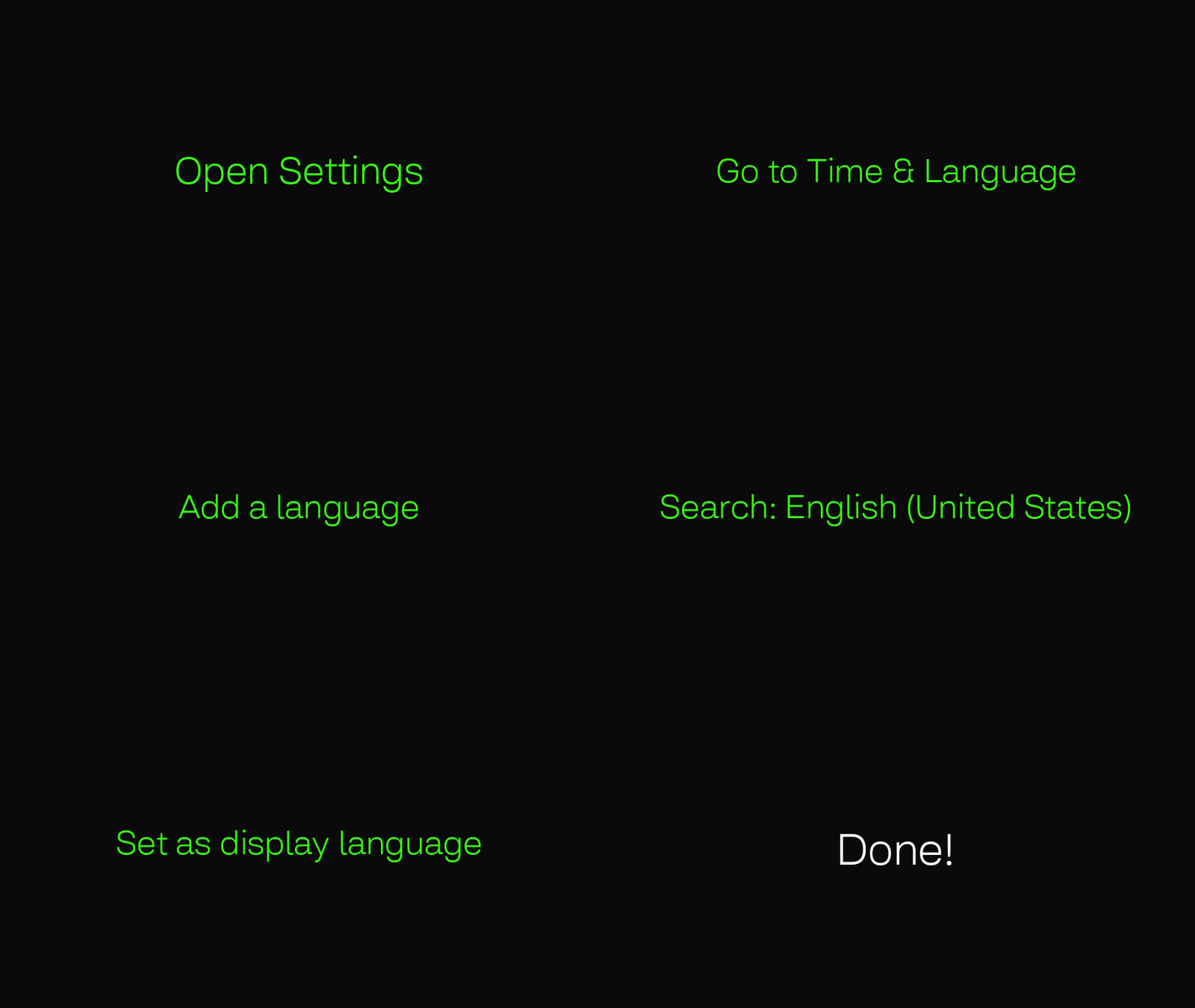
Install & Launch
- Install the game via Portal or Steam:
- Launch the game.
- Make sure your microphone is selected correctly.
3. IMPORTANT! Voice Setup (Don’t Skip!)
⚠️ This is the most important step for a smooth experience
Before starting your first session:
Run the Speech Recognition Test:
- Speak clearly.
- Use normal pace.
- Wait for the result of the test and confirm the successful recognition!
VOICE TIPS:
- Use a quiet environment.
- Set your correct default microphone in Windows.
- Avoid multiple active input devices.
- Follow the command structure shown in-game.
4. Pick Your First Airport
Start simple to avoid being overwhelmed.
Recommended:
- Smaller or medium traffic airports like TIST, KBUR or EDDS.
- Lower traffic settings.
Game feels overwhelming?
- Start with smaller airports.
- Reduce traffic density.
- Take it slow — it gets easier!
5. Your First Commands
Start with these simple commands:
- “GOLDSUN 2037 pushback approved expect runway 16L”
- “GOLDSUN 2037 runway 16L”
- “GOLDSUN 2037 runway 16L line up and wait”
- “GOLDSUN 2037 runway 16L cleared for takeoff”
- “GOLDSUN 2037 contact departure”
6. Your First Goal
Don’t aim for perfection — just try this:
- Get one aircraft to take off.
- Land one aircraft successfully.
- Avoid collisions.
That’s a successful first session!
7. Common Issues (Quick Fixes)
Voice not working?
- Run a speech test again.
- Check microphone input.
- Speak clearly using standard phrasing.
Commands recognized incorrectly?
- Use exact command structure.
- Avoid extra words.
- Reduce background noise.
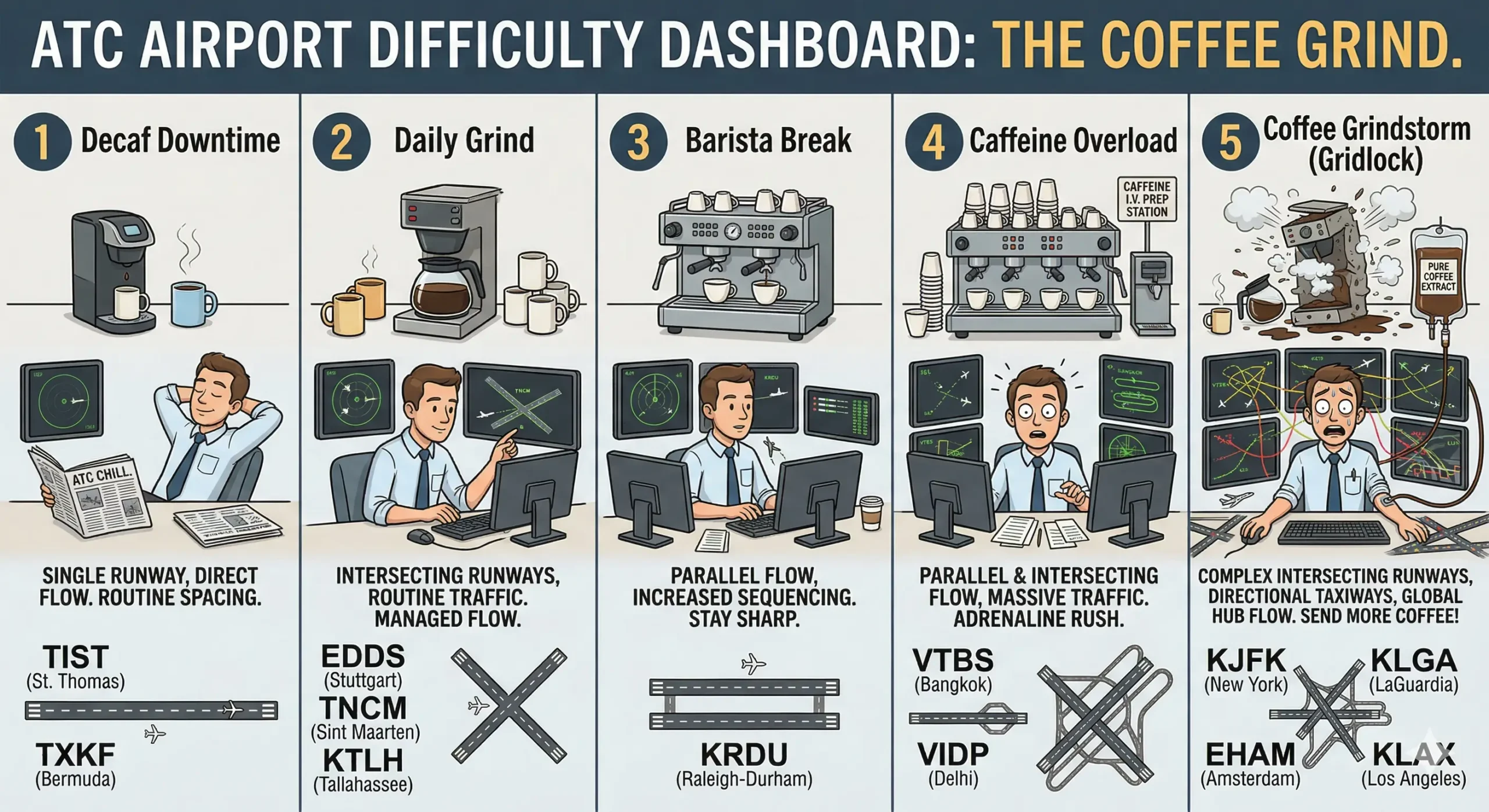
8. Difficulty Levels
To make it easier to understand what sort of a challenge should you expect for a given difficulty level, we prepared a short guide below:
9. Want More?
Once you’re comfortable:
- Try busier airports like KLGA, KLAX or VIDP.
- Use real-world traffic https://shorturl.at/oVLrB
- Join multiplayer.
- Download community schedules, airports, add-ons.
Discord: https://discord.gg/fAMVkbcknn
Suggestions: https://tower-suggestions.nolt.io/
If you want more information about how to get started, ATC tips, and a complete list of commands, go here: https://shorturl.at/ZqSrO
Quick Start (2-Minute Version)
If you want to jump in immediately:
- Launch the game.
- Run Speech Recognition Test.
- Load an airport.
- Say “DENALI 865 HEAVY runway 16L”
That’s it – you’re controlling traffic!
